Poster Presentation Guidelines and Information
Poster Presentation Guide for Students
What's a Poster Presentation?
Think of a poster presentation like creating a visual story of your research on a big poster board. Instead of writing a long paper or giving a speech, you'll design a poster that shows what you discovered. During the symposium, you'll stand by your poster and chat with people who stop by to learn about your work. It's a great way to share your research and answer questions in a relaxed, conversational setting!
Important Dates & Judging
Posters will be judged starting at noon on Wednesday, so make sure yours is set up by then. Online posters will be judged online, and in-person posters will be judged on-site. If you'd like your poster added to VSU's research collection, just email us a copy!
How big should my poster be? Your poster can be up to 4 feet wide by 3 feet tall (or flip those dimensions if you prefer). We'll provide the board and stand for you on setup day.
If you're using PowerPoint to design your poster, you can set it to:
- Landscape (horizontal): 48" wide × 36" tall, OR
- Portrait (vertical): 36" wide × 48" tall
Can my poster be smaller? Yes! These are maximum sizes - your poster can definitely be smaller if that works better for you.
How do I attach my poster? We'll provide two-sided tape for mounting.
Need extra space? Let us know if you'd like a table to display your laptop, samples, lab notebooks, or handouts alongside your poster. We have a limited number available.
Where should I print it? VSU New Media Services in Odum Library can print your poster, and the best part - the Undergraduate Research Council will pay for it!
Note: It's fine if they print your poster smaller than the maximum dimensions. Lamination isn't required, and if you want it, posters that are 3' × 4' need to be cut in half first.
When should I print? Print your poster at least two days before the symposium to avoid last-minute stress.
Your poster needs to connect to the research you described in your abstract submission. Think of it as a visual version of your research story.
Key sections to include:
- Title - What's your research about?
- Abstract/Research Question - What were you trying to find out?
- Methodology - How did you do your research?
- Results - What did you discover?
- Discussion - What does it mean?
- Conclusions - What's the bottom line?
You can adjust these section names to fit your specific research!
Make it readable from a distance: People should be able to read your text and see your images clearly from about 6 feet away (that's about two arm-lengths).
Less is more: Your poster should be easy to understand without you having to explain everything. Aim to keep text covering less than 40% of your poster - use pictures, charts, and graphs to tell your story!
Reading flow: Most people read from left to right and top to bottom, so organize your content that way.
Font choices:
- Title: Use an easy-to-read font like Verdana, size 80, bold, ALL CAPS (and keep it the same as your abstract)
- Section headers: Try Helvetica, larger sizes
- Main text: Times New Roman works well
- On graphs/charts: Make sure text is at least size 28 so it's readable even if someone prints your poster on regular 8.5" × 11" paper
Colors: Use high contrast for readability - dark text on white background or bright colors on white work great. Keep backgrounds simple so they don't distract from your content.
Photos and images: Use high-resolution images, and make sure all figures and tables have numbers and captions.
Posters will be judged, and monetary awards are given for the best posters in different fields. Do your best, but remember - this is also about learning and sharing your work!
The following is an example of an acceptable poster layout
(For additional info about each section, please read the notes at the bottom of the poster)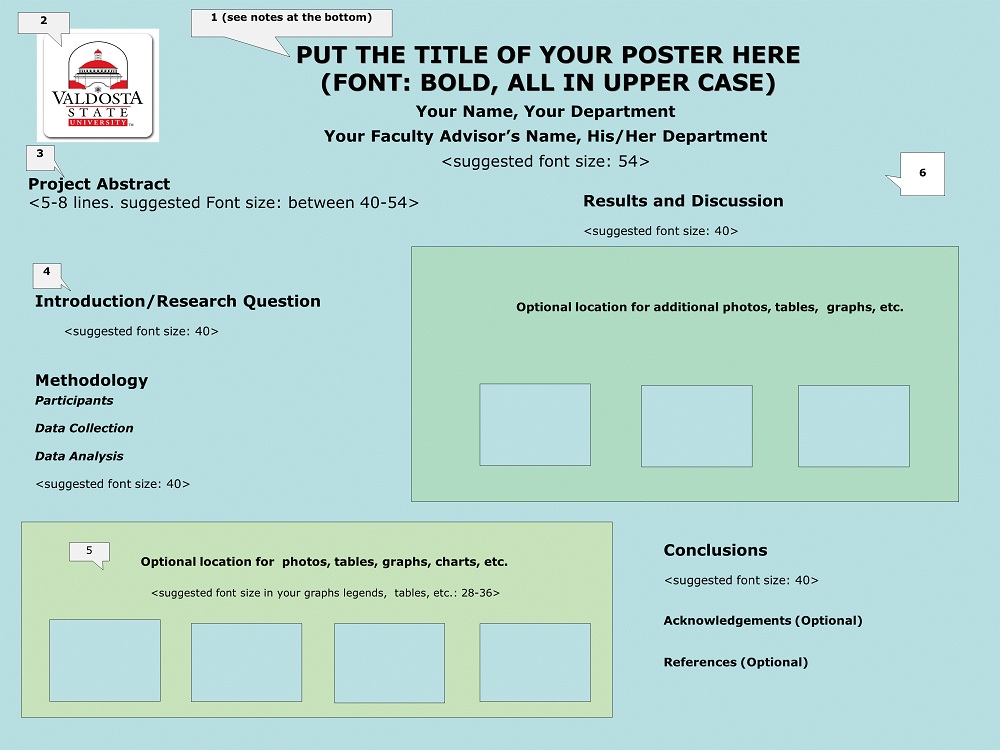
Notes:
- Title should be in an easy-to-read font, such as Verdana, font size should be 80, bold type, written in all upper case. Please do not change your title after you have submitted your abstract.
- Instead of the VSU Logo, a picture of the author(s) can be placed here.
- The abstract should be the same abstract that you submitted in your proposal and is in the Symposium Program.
- You are not limited to the section headings shown on this template and can use other section titles that are appropriate for your research. Change section subheadings as appropriate for your research.
- You can use as many high-resolution pictures, tables, or graphs that you like and can place them anywhere on your poster with an appropriate margin. However, the font size used on the graphs, pictures, or tables should be at least 28, so that all words and numbers are still readable after the poster is printed on an 8.5 X 11 sheet of paper. Figures and tables should have numbers and legends.
- You can use any background color that you like for your poster. It is suggested that you use a simple background to avoid distraction. Dark colors on a white background or bright colors on a white background make it easier to read your poster.
Check out our Poster Design Video for a walkthrough of the process.
Need Help?
If you have questions about your poster presentation, reach out to: Dr. Kelly Davidson at kfdavidson@valdosta.edu.
You've Got This!
Creating a poster might seem intimidating if you've never done it before, but think of it as a creative project where you get to showcase something you've worked hard on. Start with a rough layout, don't be afraid to ask for feedback, and remember that everyone at the symposium is there to support undergraduate research - including yours!
Student Research Council
- Martin Hall 1302 N Patterson St. Valdosta, GA
-
Mailing Address
1500 N. Patterson St.
Valdosta, GA 31698 - Phone: 229.253.2985
8:00 AM - 5:00, M-F