Day One Program
Day 1 is a textbook savings program designed to ensure student have their required materials the first day of class as a highly competitive rate. Day 1 provides the required digital course materials when instructors are using interactive courseware platforms or digital books instead of printed textbooks. This allows us to reduce the student cost in comparison to traditional printed textbooks.
Why Day 1
The cost of printed textbooks has increased tremendously over the last few years. As new textbook sales decline, used and rental textbooks (which are often the more affordable options), are becoming harder to obtain. As a result, students are sacrificing academic success by not purchasing course materials at all.
Day 1 allows the Bookstore to negotiate pricing with publishers to get students great discounts. Also, since the books are digital, they can be delivered to students on or before the first day of class.
The Process
- Instructors choose the course content they would like to use. Day 1 Access: An Instructor's Guide
- The Bookstore works with the publisher to negotiate the lowest price available in the marketplace.
- When a student registers for the course, they receive an email with instructions on how to access their materials through BlazeVIEW and how to opt-out of Day 1.
- On the first day of class, access is granted to all enrolled students
- The charge is automatically added to the student account in Banner, once the student registers for the participating class.
- Should a student opt-out, they will need to do so by the drop/add deadline and will be responsible for obtaining their materials separately.
Student Benefits
- Students will ALWAYS pay less than the cost of the traditional printed materials sold in the Bookstore. The savings can add up to 50%, sometimes more. Day 1 Access: Student Guide
- Students are able to choose if they want to use Day 1. With Day 1, students can try it before they buy it! Students have until the end of drop/add period to use the materials. During this time, they can choose to opt-out and not be billed for the materials (thus losing their access).
- Students save time and frustration. No waiting in line at the bookstore. No waiting for materials to come in the mail. Course materials are automatically available digitally on the first day of class. *
- Students are more successful in these types of courses due to being prepared on the first day and increased interaction with course content.
*If ordering course materials online, you will not add a Day 1 item to your shopping cart. Your course materials will be provided without charge through Add/Drop period. If you are still enrolled in the course and have not chosen to opt-out of Day 1, your Student Account will be charged.
Frequently Asked Questions
-
Q. How much does Day One Access cost?
The price varies upon the materials your instructor uses, but D1A materials are less expensive than purchasing directly from the publisher or other vendors. You will receive an email with information on which classes are part of the program and how much you will be charged for each material.
-
Q. When/how do I pay for the Day 1 Access charge?
The charges are automatically applied to your Student Account when you register for the class. Students must make payment to the Bursar’s Office by fee payment deadline. If you have Student Financial Aid funds still available, the Bursar’s Office may automatically apply them against the Day 1 charge. -
Q. What does “opt-out” mean?
To “opt-out” means you do not want to participate in Day 1. It means you do not want the automatic access to your course materials and do not want the bookstore to charge you for those materials after the deadline. Opting out indicates you are choosing to obtain access to the required course materials through some other means. If you already have the required course materials, or want to purchase them elsewhere, you will need to opt-out within the first 14 days of class. Once you opt-out, you will no longer be able to access the materials through Day 1.
-
Q. How do I opt-out?
Access the Day 1 Course Material link in your BlazeVIEW course.
Select the “Want to opt out?” option.
Students will continue to have access to their Day 1 materials up until the Opt Out deadline and can opt back in.
Students who opt out will be able to continue their access after the opt-out deadline by purchasing at the nationally available price.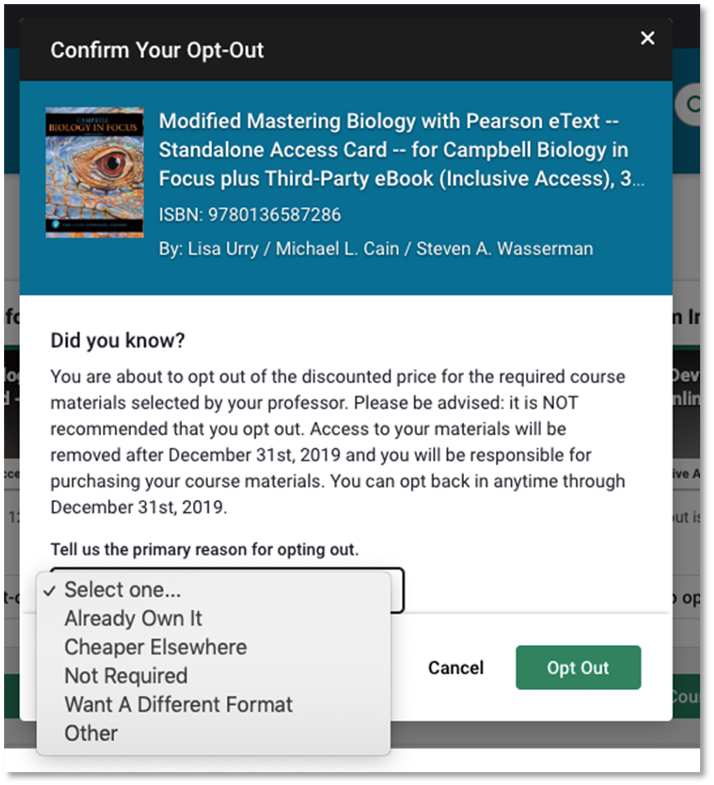
-
Q. I changed my mind. Can I opt back in?
You can easily opt back into the D1A program within the first 14 days of your class. If you need to opt back in, navigate to the “Day 1 Course Material” link found in your BlazeVIEW course and select the “Opt-In” option.Once that time has passed, you will need to acquire the materials on your own.
-
Q. What if I drop the course?
If you dropped the course during Add/Drop, you will automatically be opted out and will not be charged for the Day 1 course materials. Students that drop after the Add/Drop deadline will be charged for the cost of the Day 1 Access materials.
-
Q. Who should I contact if I’m having trouble accessing the materials?
The eCampus Day 1 Access support team can be reached by email at at iasupport@ecampus.com.
-
Q. I don’t see my question here; who should I contact to ask?
Please email auxiliary@valdosta.edu
Bookstore
-
Student Union Building
1500 N. Patterson St.
Valdosta, Georgia 31698 -
Mailing Address
1500 N. Patterson St.
Valdosta, GA 31698 - Phone: 229.333.5666
- Fax: 229.245.2232
Monday-Friday
8:00 a.m. - 5:00 p.m.