eCore

What is eCore?
eCore is a statewide collaborative program which enables University System of Georgia (USG) students to earn most of their core credits by taking courses offered by various state institutions while remaining enrolled in one home college or university. eCore courses are designed, developed, taught and supported by faculty and staff from across the USG.
Overview
VSU students can enroll in eCore classes to complete core coursework in a fully online environment. Whether you are a current VSU student completing your core requirements, a transient student from another institution, or you just need to pick up a core course, eCore gives you the flexibility of an online course with a guarantee of quality in both instruction and content.
For more information about eCore, including course information and requirements, visit the USG eCore website or contact the VSU eCore Liaison.
Registration
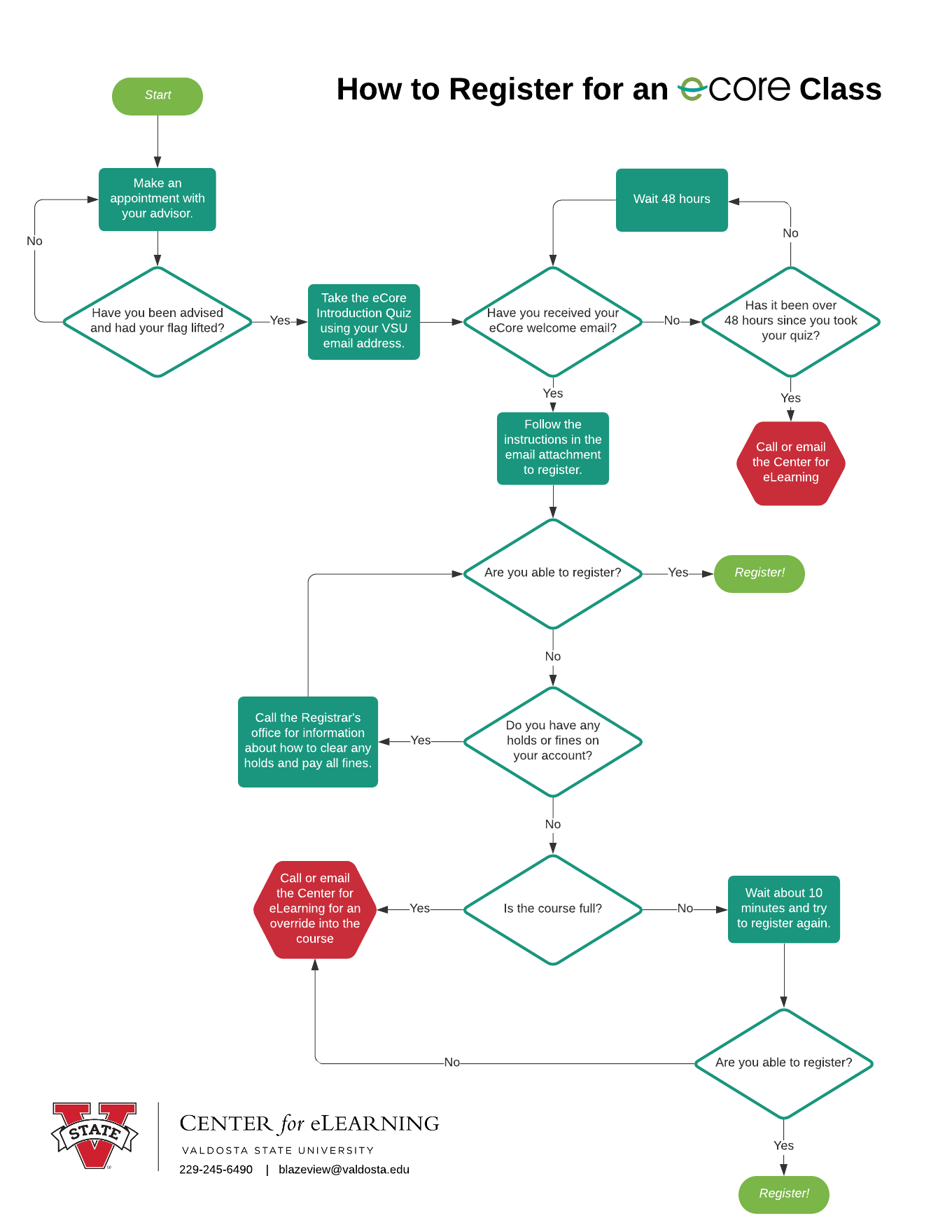
Refer to the eCore Registration Flowchart for an overview of the registration process.
To begin the process, contact your advisor. Once you have determined you plan to take an eCore class for the first time, please complete the eCore Introduction Quiz.
You will need to have your VSU student ID (870#) and your VSU email address to complete the quiz. If you are not a current VSU student, please visit VSU Undergraduate Admissions to begin your admissions process.
Once you complete the introduction quiz, the VSU Center for eLearning will send a welcome email to your VSU email address within 48 hours (2 business days). This email will include an attachment with detailed instructions for registering for your eCore classes through Banner and accessing your GoVIEW account once your term begins.
Academic Calendar
eCore is part of the University System of Georgia Collaborative Programs. The eCore Academic Calendar dates often differ from the VSU Academic Calendar dates. Please review and save the eCore Academic Calendar for registration and other important course dates.
Adds, Drops, and Withdrawals
VSU students follow the VSU Academic Policies and Procedures for adding, dropping, and withdrawing from eCore courses.
NOTE: eCore instructors do not complete Late Registration forms, so please email the VSU Registrar for assistance with completing that section for eCore classes.
Equivalency Guide
Visit the eCore Course Equivalency page and select Valdosta State University to view the information on how each of the eCore courses fit into VSU Core Areas A-F.
Proctored Assessments
eCore courses contain at least one proctored assessment experience or one major project of significance that includes a recorded video presentation for additional verification of student identity. Laboratory science courses and most math courses include one or more proctored assessment experiences. Completion of the proctored assessment experience or major project is required.
For more information or assistance with testing in your eCore class, visit the eCore Proctored Experience Information page or contact eCampus Testing.
- eCampus Testing Coordinator: etesting@ecampus.usg.edu
- General Proctored Exam Questions: 678-839-5300
- Issues Taking a Proctored Exam or Accommodation Questions: 678-839-4900
Instructor Information
If you need to contact your instructor, you can locate their preferred contact information in the course syllabus, or you can locate their email address on the Course Schedule page. Select the semester, year, and session at the top of the page, then search for your course and section. Your instructor's name and email address will be listed to the right of the section.
Need Additional Assistance?
The following resources are available to assist you with your eCore classes.
- VSU eCore Liaison: 229-245-6490 or blazeview@valdosta.edu
- eCore Helpdesk: 855-933-2673
- D2L Help Center: 855-772-0423
eCore Registration Flowchart
Center for eLearning
-
Converse Hall
Suite 3200
Email Address
blazeview@valdosta.edu -
Mailing Address
1500 N. Patterson St.
Valdosta, GA 31698 - Phone: 229.245.6490
Office Hours
Monday - Friday
8 AM - 5 PM